
Restricting AI Tools to Corporate Accounts: Stop Model Ingestion Without Proxy Nightmares
Allowing employees to use ChatGPT or Claude with personal accounts risks public model training ingestion and accidental chat sharing. Learn how EyeBall enforces corporate-only AI accounts directly in the browser—with zero network proxies or firewall misconfigurations.
Every workday, thousands of employees open ChatGPT, Claude, Google Gemini, or Perplexity to summarize client meeting transcripts, draft financial proposals, debug proprietary source code, and compose executive memos.
AI has become the ultimate workplace productivity multiplier. But for IT directors, CISOs, and managed service providers (MSPs), there is a quiet, ticking liability hiding in plain sight: employees logging into AI tools with their personal consumer accounts (@gmail.com, @outlook.com, or personal Apple IDs) on corporate laptops.
When confidential company data enters a personal AI account, it exits your security perimeter entirely.
In this guide, we break down why personal AI accounts pose an existential risk to corporate data, why the traditional vendor solution (Network Tenant Restrictions) is a fragile, expensive operational nightmare, and how modern browser-native defense lets you enforce corporate-only AI access in minutes—with zero network proxies.
The Simple Analogy: A Corporate Vault vs. A Public Cafe Diary
To understand why account identity matters so much in Generative AI, consider a simple analogy:
Corporate AI Workspace (Enterprise Tier): Think of this as your company’s private digital vault. It comes with legal data-processing agreements (DPAs), strict privacy guarantees that your prompts are never used to train public models, encrypted storage, and SOC 2/HIPAA audit trails.
Personal AI Account (Free / Plus Tier): Think of this as an employee writing company intellectual property into a personal spiral notebook and leaving it open on a table in a crowded coffee shop. The vendor reserves the right to absorb that text into its foundational brain, and anyone with the link can read it.
Even if an employee has zero malicious intent, using a personal account on a company laptop bypasses every data security safeguard your business has established.
The 3 Critical Risks of Personal AI Accounts in the Enterprise
Why can’t IT just let employees use whichever account they already have logged in? Here are the three primary failure modes:
1. Permanent LLM Model Training Ingestion (Data You Can Never Get Back)
Under consumer terms of service for most major AI vendors (including OpenAI and Anthropic), user prompts, uploaded spreadsheets, and code snippets in personal or free accounts are retained and used to train future foundational models unless manually opted out via buried settings.
Once your company’s proprietary algorithm, unpublished financial results, or customer database records are ingested into an LLM’s weights, it is mathematically impossible to delete or redact that data. If an external researcher or competitor prompts that model with the right adversarial queries, fragments of your proprietary data can be regurgitated verbatim.
2. Accidental “Share Chat” Links & Public Search Indexing
Every major AI chat interface features a convenient “Share link to chat” button. Employees frequently use this feature to share an AI-generated solution with a colleague or contractor.
The danger? These shared links generate public, unauthenticated URLs. If that chat contained customer PII, internal API keys, or confidential strategy notes, that URL is now accessible to anyone on the internet. Worse yet, major search engine crawlers regularly scrape and index publicly shared AI conversations, making private corporate communications searchable on Google and Bing.
3. Total Blindness & Compliance Violations (SOC 2, HIPAA, GDPR)
When employees interact with AI via unmanaged personal accounts, corporate IT has zero visibility:
- ✦ No audit logs of what was sent or received.
- ✦ No eDiscovery or legal hold capabilities.
- ✦ Immediate non-compliance under GDPR (unlawful international data transfers), HIPAA (unprotected health information exposure), and SOC 2 Type II trust criteria.
If a breach or regulatory audit occurs, your organization cannot even answer the baseline question: “What corporate data was submitted to third-party AI platforms this quarter?”
The Traditional Vendor Fix: Network Tenant Restrictions (And Why It Fails)
Major cloud and AI vendors recognize this problem. Their official technical recommendation is a mechanism known as Tenant Restriction via HTTP Header Injection.
For instance, OpenAI Enterprise and Microsoft Entra advise organizations to configure network gateways to inject custom HTTP headers into outbound web requests:
X-OpenAI-Tenant-Id: <Your-Enterprise-Tenant-GUID>Restrict-Access-To-Tenants: <Your-Corporate-Domain>
When the vendor’s authentication servers receive the request, they inspect this header. If the user attempts to log in with an account outside that approved tenant, the vendor denies the login.
On paper, this sounds reasonable. In the real world, it is an operational disaster. Here is why:
[Employee Browser]
       │ (Encrypted HTTPS)
       ▼
[Network Proxy / Firewall]  <── Requires breaking TLS (SSL Interception)
       │ (Injects custom header) <── Must be perfectly synced with IdP
       ▼
[AI Cloud Server]
       │
   CRITICAL FLAW:
   The moment the laptop disconnects from office Wi-Fi or VPN,
   the proxy is bypassed entirely. Protection = 0%.
The 4 Major Flaws of Network-Layer Tenant Restrictions:
- The “Perimeter Trap” (Fails Outside the Office): Network header injection is typically deployed on an on-premise firewall or corporate gateway. The exact second a hybrid or remote employee closes their laptop, goes home, or connects to a hotel Wi-Fi without turning on a sluggish full-tunnel VPN, the header injection ceases to exist. The employee can immediately log in with their personal account and leak data.
- Requires Breaking TLS (SSL Decryption): To inject an HTTP header into an encrypted HTTPS request to
chatgpt.comorclaude.ai, your network security stack must intercept, decrypt, alter, and re-encrypt every single packet. This requires rolling out custom enterprise root certificates (CA) to every endpoint. - High Latency & Broken Certificate Pinning: Decrypting AI streaming tokens in real time introduces noticeable lag, degrading user experience. Furthermore, modern web applications that utilize strict certificate pinning frequently break, flooding IT helpdesks with support tickets.
- The Bidirectional Misconfiguration Nightmare: Tenant restrictions require exact, synchronised configuration across both your network hardware and your identity provider (Azure AD / Okta). A single syntax typo, GUID mismatch, or vendor API update can lock entire departments out of their authorized tools or silently fail open.
The Modern Alternative: In-Browser Identity Hardening with EyeBall
Enterprise security must follow the user, not the network wire.
Since employees interact with AI tools directly inside the browser, the browser is the only place where policy enforcement can be 100% reliable, zero-latency, and immune to network bypass.
EyeBall Security takes an entirely new architectural approach: Browser-Native Account Hardening.
Instead of routing traffic through heavyweight cloud proxies or reconfiguring network firewalls, EyeBall operates client-side directly within Google Chrome, Microsoft Edge, and Brave.
How EyeBall Restricts AI to Corporate Accounts in 3 Steps:
Step 1: Real-Time Account Identity Detection
When an employee navigates to ChatGPT, Claude, Gemini, or Copilot, EyeBall’s DOM-level sensor immediately inspects the active authenticated user profile and session email in browser memory—before any prompt can be dispatched.
Step 2: Policy Validation Against Corporate Identity
EyeBall checks the authenticated email domain against your company’s sanctioned tenant list:
- ✦ Logged in with
user@yourcompany.com? → Full access granted. Prompts proceed seamlessly with real-time DLP protection. - ✦ Logged in with
john.doe@gmail.comor a personal account? → Instant Policy Trigger.
Step 3: Inline Account Hardening & Guided Remediation
If an unauthorized personal account is detected, EyeBall instantly disables prompt input fields and presents a clean, non-intrusive banner:
Corporate Security Notice: “Access to AI tools is restricted to company-managed enterprise accounts to prevent proprietary data leaks. Please sign out and sign in using your
@yourcompany.comSingle Sign-On (SSO) credentials.”
No proxy lag. No broken SSL certificates. And zero ability for employees to bypass the policy by turning off their VPN or working from a home Wi-Fi network.
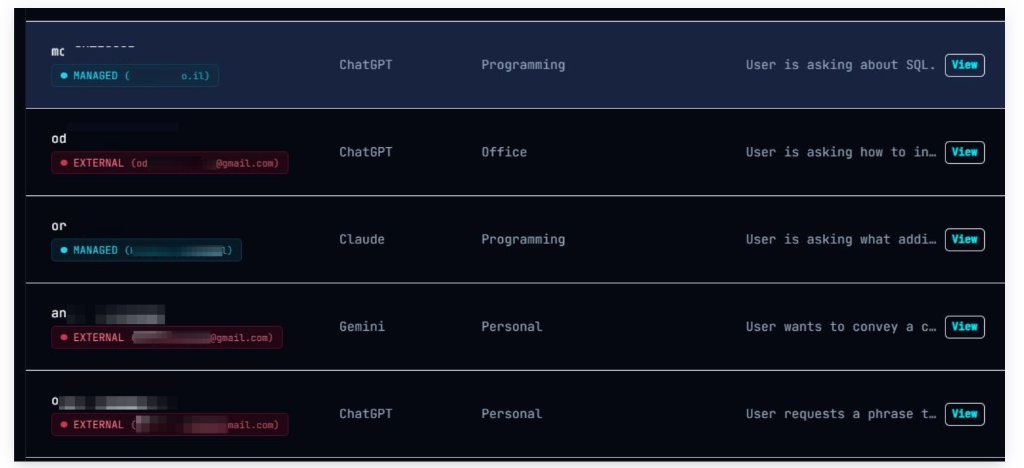
Complete Fleet Visibility: See Every Personal Account in Use
Enforcing policy is only half the battle; defenders also need empirical visibility.
As shown in the EyeBall telemetry dashboard above, administrators get instant clarity into:
- ✦ Managed vs. External Sessions: Instantly see which users are operating within approved corporate workspaces (
MANAGED) and who is logged in via unmonitored personal accounts (EXTERNAL- e.g., consumer@gmail.com). - ✦ Cross-Platform AI Usage: Granular tracking across all major engines simultaneously—ChatGPT, Claude, Google Gemini, and emerging LLMs.
- ✦ Intent & Category Classification: Understand the nature of AI usage across teams (e.g., Programming queries vs. Office documents vs. Personal browsing) to pinpoint high-risk behaviors without violating employee privacy.
- ✦ Prompt Forensics: Real-time visibility into prompt topics to audit exposure and prevent sensitive code or intellectual property from leaving the organization.
5-Minute Silent Rollout: Built for Lean IT and MSPs
You shouldn’t need a 10-person network architecture team to protect company data from AI leaks.
EyeBall was engineered for real-world IT defenders:
- ✦ Zero Hardware or Proxy Appliances: Nothing to route, no DNS records to alter, and no PAC files to push.
- ✦ Universal Silent Deployment: Roll out silently to 50 or 5,000 endpoints in minutes using Microsoft Intune, Active Directory GPO, or your existing RMM tool (NinjaOne, Datto, ConnectWise, Atera).
- ✦ Preserves Employee Browser Profiles: Employees keep their bookmarks, extensions, and preferences without being forced to switch to a clunky proprietary “enterprise browser.”
Protect Your Corporate Intellectual Property Today
AI productivity shouldn’t come at the expense of corporate data sovereignty. You don’t have to choose between blocking AI completely or letting sensitive secrets slip into public training models.
Schedule a live 15-minute demo with the EyeBall engineering team, or deploy EyeBall across your pilot fleet via Intune or GPO today to eliminate your AI blind spots with zero friction.